 Bregvorn
BREGVORN · FREE STREAMING TOOLS
Your Stream, Chat and Activity Feed in One Dashboard
Watch your stream, read combined chat and follow your activity feed in one free browser dashboard. Build a second-monitor stream manager around the information you actually use.
Try the demo dashboard · Open free dashboard
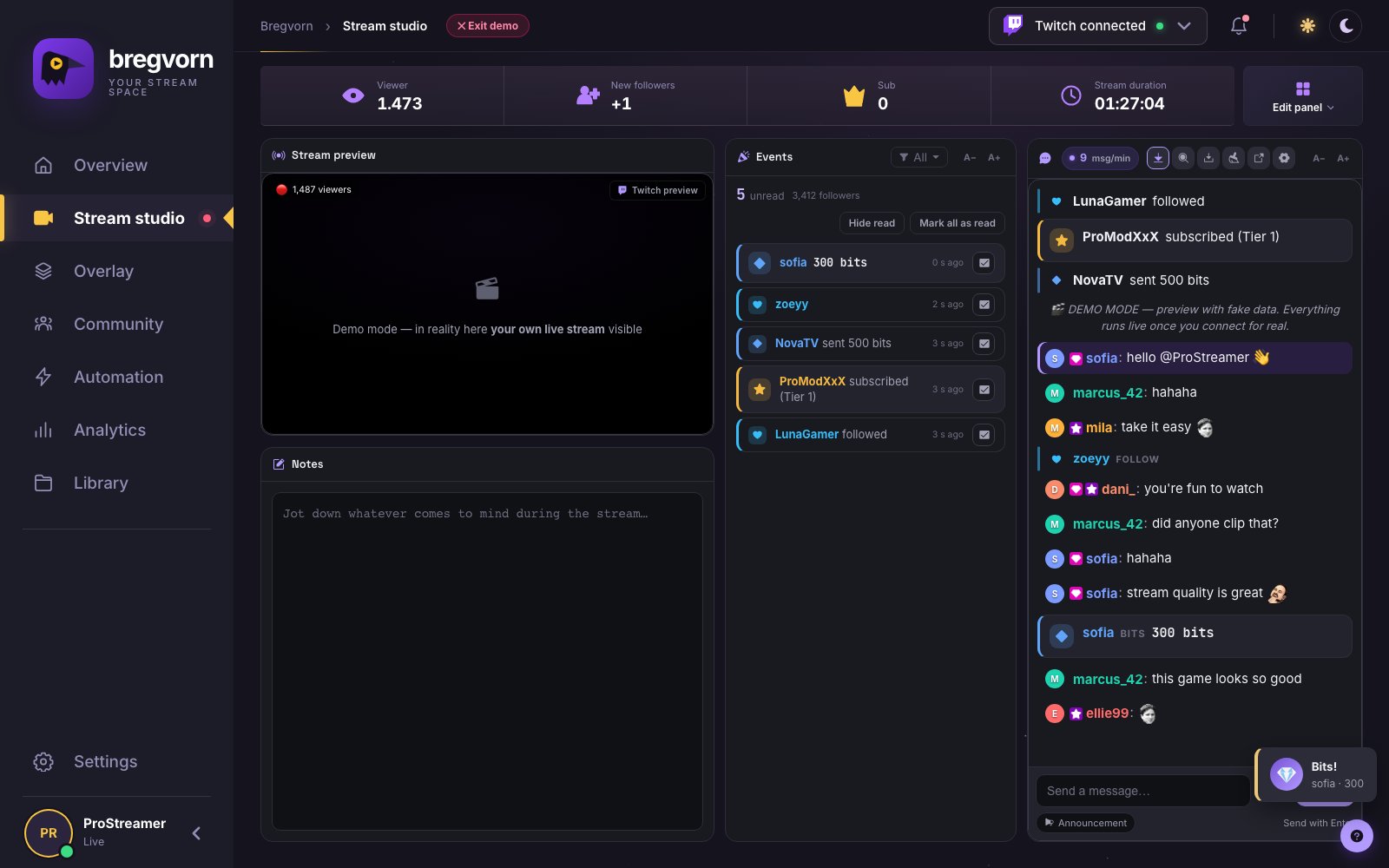
Your stream preview, chat and activity feed in one place
Bregvorn is a streamer dashboard for monitoring and managing a broadcast alongside OBS. Keep the stream preview next to Twitch, Kick and YouTube messages, incoming support events, viewer information and notes. A viewer message and a new subscription become part of one working screen, so you can respond without repeatedly switching between platform dashboards.
Read follow, subscriber and donation notifications inside chat
Supported follow, sub, gift-sub, bits, donation and raid events can appear as event cards in your chat feed. Different event sizes make larger support easier to notice; individual event types can be hidden. These are readable notifications in your own dashboard. They are separate from animated OBS alerts and separate from a bot posting a thank-you message to public chat.
Keep track of whom you have thanked
The activity feed holds incoming events with their available names, amounts, messages and relative times. Mark an event read after acknowledging it, mark it unread again, hide read events or mark everything read. Filter several event types at once to focus on the notifications that matter during a busy stream.
Make the workspace fit your monitor
Move and resize the main studio widgets, remove what you do not use, add it back from Edit panel and start from a layout template. Layout and closed-widget choices are remembered. The Quick actions widget, when enabled, stays at the bottom at full width; it is an exception to freely positioned widgets.
Readable text without enlarging the whole page
Use the chat A−/A+ buttons to change text size between 12 and 40 pixels. Events, activity and viewer-list widgets have their own text controls. A larger chat font does not force every panel element to become larger. Pair the text size with a wider chat widget for a second monitor placed farther away.
Quick actions for live moments
The optional quick-action area includes stream information, polls and predictions, clips, VOD markers, mute, chat lockdown, break mode, ads, saved messages and raids. Each action still needs the relevant platform support and account permissions. You can hide this area to give the reading widgets more room.
A second-monitor setup you can actually use
Open OBS on your production screen and Bregvorn in a browser on the second monitor. Connect the accounts you stream on, open the studio, place chat where your eyes naturally return and keep the activity feed beside it. Check the preview and notification audio before going live. A pop-out chat window is available when you want chat on a separate display.
What this dashboard does and what broadcasts your stream
Bregvorn combines monitoring, chat and supported management actions. OBS or your chosen encoder still captures, composes and broadcasts the video. Connecting multiple chats does not automatically restream your video. Twitch has the deepest management integration; YouTube chat can be read but not replied to from the panel.
What do you want to do?
| Your goal | Guide to open |
|---|---|
| I want chat, alerts and my stream on one screen | Free Streamer Dashboard for Twitch, YouTube & Kick |
| I want larger chat text and movable widgets | Free customizable streaming dashboard |
| I want to see follows and subs inside my chat panel | Free Stream Activity Feed & Chat Event Notifications |
| I want !discord to show my invite | How to Add a !discord Command on Twitch and Kick |
| Post my Discord link every 10 minutes | Free Twitch Chat Timers & Automatic Messages |
| Reply when someone says hello | Free Keyword Auto Replies for Stream Chat |
| Thank new subscribers in public chat | Automatic Follow, Subscriber & Raid Thank-You Messages |
| Remove banned words and filter spam | Free Twitch Auto Moderation: Spam & Banned-Word Filters |
Questions and answers
Is it free to use?
Free to use during the current pre-alpha. No payment card required. Connect your streaming account to use live dashboard features.
Can I use Bregvorn as a stream dashboard for my second monitor?
Yes. Open the dashboard in a browser, connect your channels and arrange preview, chat and events for the screen. Keep it open while using live panel features.
Can I see alerts in the same window as chat?
Yes. Supported events can appear as cards in the panel chat, with per-event visibility controls. Use the activity feed to mark notifications read; use OBS overlays to show animated alerts to viewers.
Related features and setup guides
Related free tools
Free use and account access
Free to use during the current pre-alpha. No payment card required. Connect your streaming account to use live dashboard features.
Open free dashboard · Pricing details