 Bregvorn
BREGVORN · FREE STREAMING TOOLS
Free multistream chat for Twitch, Kick and YouTube
Read Twitch, Kick and YouTube live chat together in Bregvorn. Platform labels, viewer context and message controls help you follow a conversation across channels without switching tabs.
Try the demo dashboard · Open free dashboard
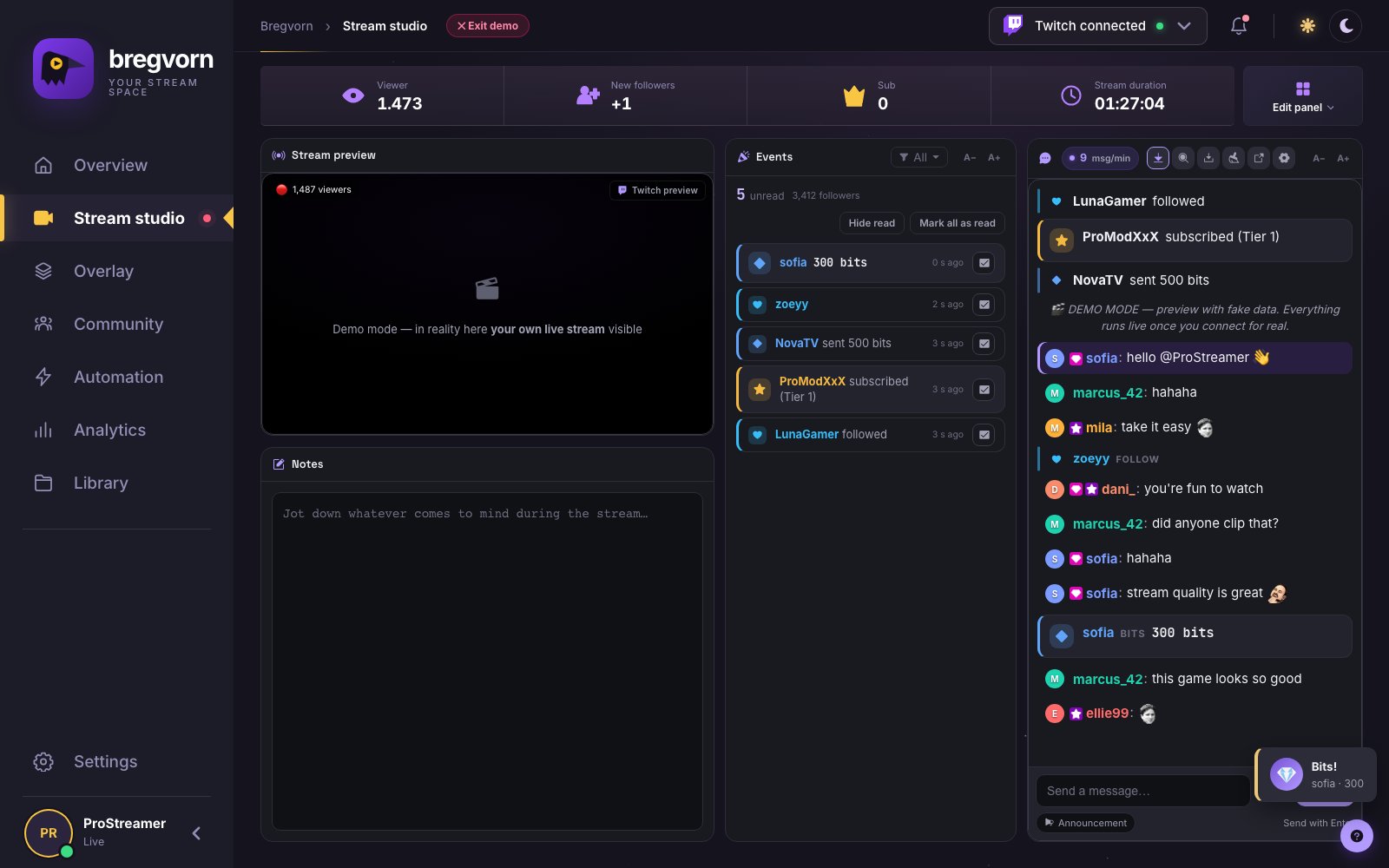
One feed, with the context intact
Messages arrive in one feed with platform labels, usernames, badges and emotes. Pause scrolling while reading, highlight mentions and keywords, and watch chat speed to spot busy moments. Twitch emotes plus 7TV and BTTV support keep the conversation readable.
Know who you are talking to
Open a viewer card from a username to inspect available message history, visits, follow age, account age and roles, and keep private notes. First-chatter and regular-viewer signals help you welcome new people and recognise returning viewers. Available details depend on the connected platform.
Send and moderate from the same screen
Send a message to Twitch and Kick from the panel. YouTube chat is read-only. Twitch message actions include deletion, timeout and ban, subject to account permissions; these actions are not equivalent on all three platforms. A separate chat window lets you put the feed on another display.
How to start
Open the free dashboard, connect the platforms you use and open Chat in the studio. Keep the panel open during your stream. This combines conversations; it does not retransmit your video to multiple platforms. The standalone Twitch chat overlay is a separate tool for displaying Twitch messages in OBS.
Choose the chat font size, not a browser zoom level
Set chat text between 12 and 40 pixels; A−/A+ changes it in two-pixel steps. The chat width is adjustable in the studio layout. Event-feed and viewer-list text controls are independent, so you can keep large messages beside compact supporting information.
Read older messages without losing your place
Scrolling up pauses automatic movement. The unread indicator counts messages arriving while you read; missed mentions receive stronger emphasis. A divider marks where unseen messages begin. Return to the latest messages when you are ready, and configure pausing on hover for comfortable reading.
Search the conversation and keep a local excerpt
Search the rendered conversation by name or message text, including matching event cards. Download the currently rendered chat as a text log when you need an excerpt. The display keeps up to 250 rows; this export is not the full channel history.
Refresh without an empty conversation
The browser can restore the last 150 saved chat messages for the same account for up to two hours. Restored messages are marked as previous messages and do not trigger commands, giveaway entries or speech again. This short local history helps recover reading context after a refresh; it is not a permanent cloud archive.
Keep support events in the same reading flow
Enable selected follow, subscription, gift, bits, donation and raid cards inside the panel chat. Use the separate activity feed to mark events read or filter event types. For an automatic public thank-you message, create an event rule in the chatbot instead.
Questions and answers
Is it free to use?
Free to use during the current pre-alpha. No payment card required. Connect your streaming account to use live dashboard features.
What do I need to get started?
Open Bregvorn in your browser and connect the streaming account you use. Check the platform support and permissions described in this guide.
Related features and setup guides
Related free tools
Free use and account access
Free to use during the current pre-alpha. No payment card required. Connect your streaming account to use live dashboard features.
Open free dashboard · Pricing details