 Bregvorn
BREGVORN · FREE STREAMING TOOLS
Free customizable streaming dashboard
Build a browser workspace around your stream with Bregvorn. Arrange chat, preview, events, viewers and notes to fit your monitor and the way you broadcast.
Try the demo dashboard · Open free dashboard
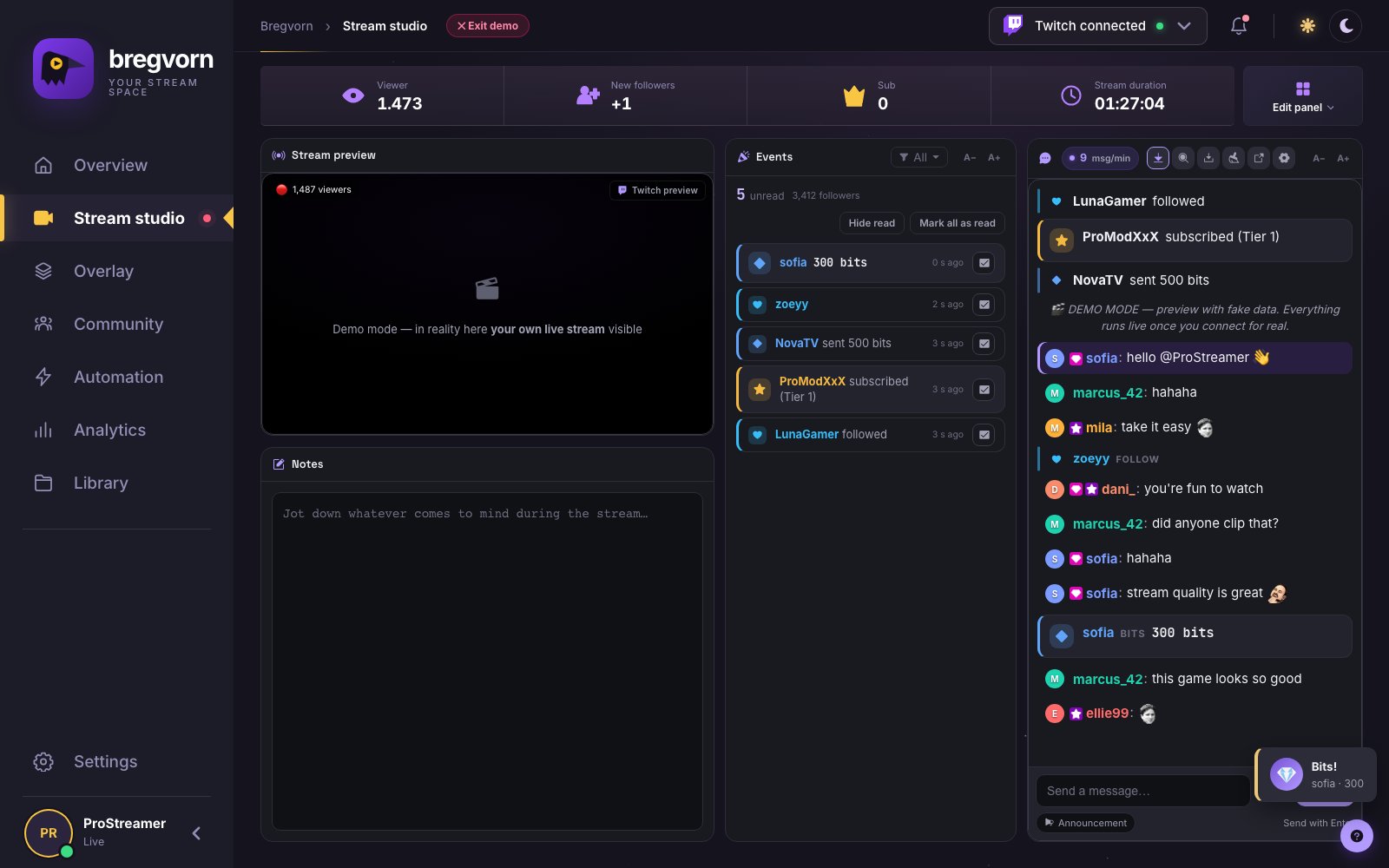
A layout you can change
Drag, resize and remove studio widgets, or start from a layout template. Your layout is saved so you can return to the same working space. Use a separate chat window when you want another display dedicated to messages.
Keep frequent actions close
Open pages and quick actions with the command palette, use the optional Quick actions widget and keep notes beside the stream preview. Quick actions stays at full width at the bottom. Stream controls include supported title updates and platform-specific category controls. YouTube does not offer the same game/category control.
Make it yours
Choose light or dark theme, use the multilingual interface and back up settings to your account. Bregvorn runs in the browser; OBS remains the software that captures and broadcasts your scene.
Move, resize, remove and bring widgets back
Open Edit panel to edit the layout, add a widget or choose a template. Arrange the main widgets around what you read most often. Removing a widget closes its place in the workspace; add it back when needed. Layouts and closed widgets are remembered for the relevant section.
Independent text sizes for different reading distances
Use the chat A−/A+ buttons for 12–40 pixel messages. Events, activity and viewer-list widgets have their own font-size controls. Change text size and widget dimensions together: a wider chat with larger type is useful on a distant second monitor, while a compact event list leaves room for the preview.
Adapt the workspace to the browser width
The studio adjusts horizontal widget placement when the available width changes, and narrow screens use a stacked layout. Templates provide a starting point you can personalize. The Quick actions widget remains pinned at the bottom at full width; hide it from Edit panel when you want more space for reading.
Stream manager or streaming studio?
Use this workspace to watch your stream, read chat, review activity and operate supported controls. It is a stream manager alongside OBS, not a camera mixer or encoder. Organizing this dashboard changes your monitoring workspace; arranging viewer-facing widgets uses the separate OBS overlay controls.
Questions and answers
Is it free to use?
Free to use during the current pre-alpha. No payment card required. Connect your streaming account to use live dashboard features.
What do I need to get started?
Open Bregvorn in your browser and connect the streaming account you use. Check the platform support and permissions described in this guide.
Related features and setup guides
Related free tools
Free use and account access
Free to use during the current pre-alpha. No payment card required. Connect your streaming account to use live dashboard features.
Open free dashboard · Pricing details