 Bregvorn
BREGVORN · FREE STREAMING TOOLS
Free Stream Activity Feed & Chat Event Notifications
Read follow, subscriber, gift, bits, donation and raid events in Bregvorn. Filter the activity feed, mark notifications read and show selected events inside your panel chat.
Try the demo dashboard · Open free dashboard
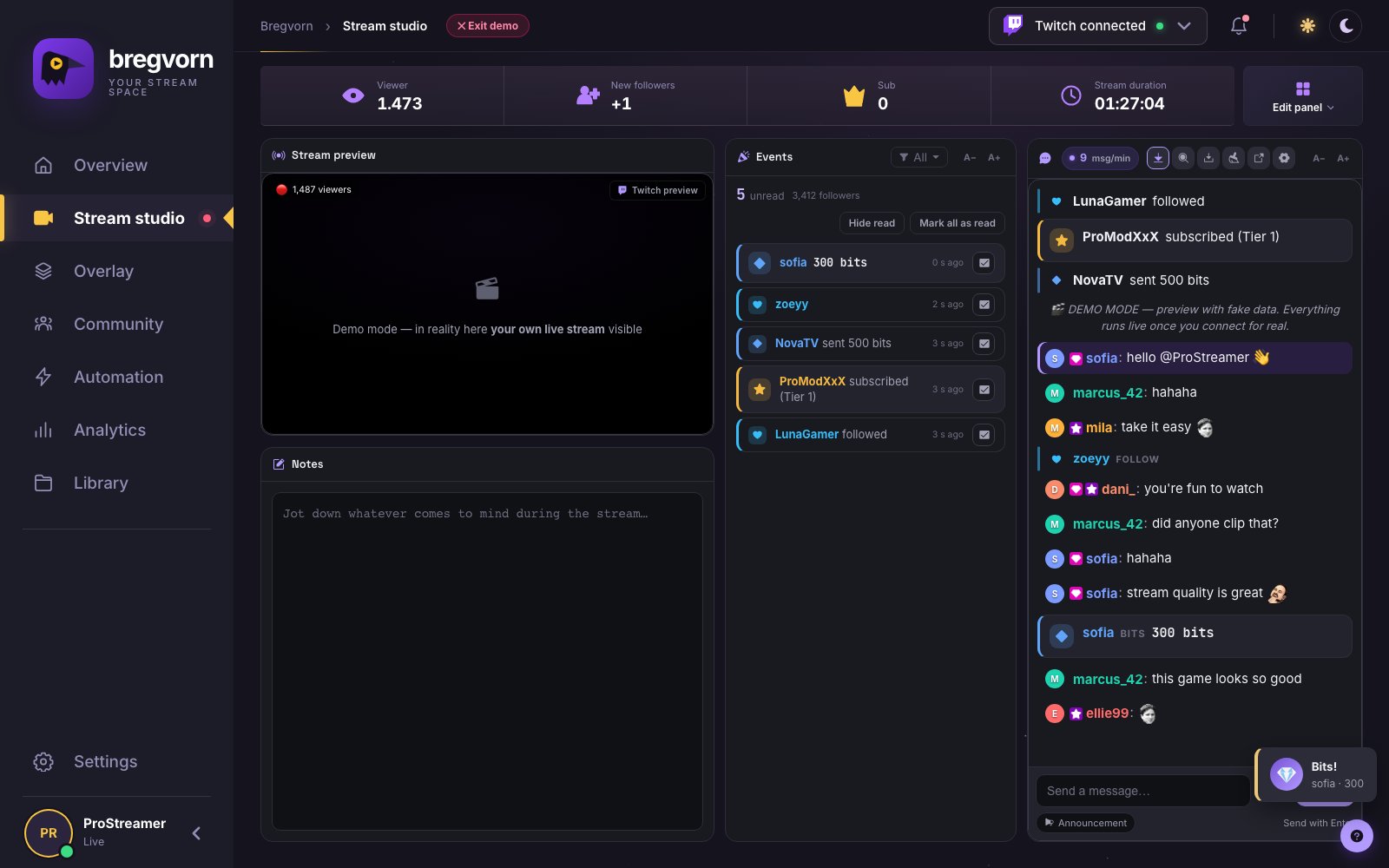
An activity feed for the streamer
The activity feed is the readable event list you monitor while broadcasting. It preserves the available supporter name, value, message and relative time for each received event. It helps answer practical questions such as who subscribed while you were concentrating on the game or which donation you still need to acknowledge.
Read and unread are working states
Mark a notification read after thanking the viewer. Read entries become less prominent; hide them to keep outstanding events visible. You can mark an event unread again or clear the unread workload with Mark all read. The unread count helps you return to missed support after a busy moment.
Filter several event types together
Show all events or select combinations such as subscriptions and donations. Event-type filters and chat event visibility are separate controls: you can keep follows out of the chat while still reviewing them in the activity feed. The selected event filter is remembered in the browser.
Event cards inside the conversation
Panel chat can contain follow, sub, gift-sub, bits, donation and raid cards between viewer messages. Follows use a compact line; donations, gifts and raids receive stronger emphasis. Bits receive different emphasis according to their amount. Select visible event types from the chat settings or Settings → Appearance.
Readable names, messages and amounts
Increase the event-feed text with its own A−/A+ controls. Chat event cards use the chat reading area and follow its scroll behavior. If you are searching chat for a person or phrase, matching event text participates in the search as well.
Three different meanings of an alert in chat
A panel event card is visible to you in Bregvorn. An OBS alert is an animation viewers see on the broadcast. A bot thank-you is a message posted to public platform chat by an automation rule. Choose the first for monitoring, the second for on-stream presentation and the third for a written acknowledgement in chat.
Connect the events you need
Event availability depends on the platform connection and permissions. Donation events can come from connected services such as Streamlabs or StreamElements. A theme having a donation animation does not itself connect a payment service. Test the relevant connection before relying on the feed live.
Questions and answers
Is it free to use?
Free to use during the current pre-alpha. No payment card required. Connect your streaming account to use live dashboard features.
What do I need to get started?
Open Bregvorn in your browser and connect the streaming account you use. Check the platform support and permissions described in this guide.
Related features and setup guides
Related free tools
Free use and account access
Free to use during the current pre-alpha. No payment card required. Connect your streaming account to use live dashboard features.
Open free dashboard · Pricing details